Open Your Business Rules!
Rules-based
Operational Decision Services
OpenRules Classic: Overview
Business Rules for Business Analysts
OpenRules® allows you to put your business analysts (not programmers) in control of the complex business logic of your mission-critical applications. You may configure your own Business Decision Management System (BDMS) that fits your specific needs in the best possible way, while at the same time minimizing license fees, software integration expenses, and the learning curves of your specialists. OpenRules® provides complete support for Executable Decisions designed by business analysts directly in Excel. The decision examples are provided at the document "Getting Started".
Additionally, OpenRules® supports rules-based web application development and integrates BR with Machine Learning and Optimization techniques.
A combination of Excel, Eclipse, and Open Source Tools, backed by OpenRules software and support, form a practical framework for full-scale Business Decision Management and rules-based Web Application Development. OpenRules® embodies an ingenious software architecture that is open to any integration solution. Extensive reuse of proven, commonly available software results in a framework that matches or exceeds similar commercial systems in speed, compactness, and ease of use.
OpenRules® provides many predefined decision tables for representation of decisions, glossaries, rule families, and various data tables. A user may customize the existing tables and create custom decision tables using a powerful rule templatization mechanism. Rule templates allow rule designers to write the rules logic once and use it many times.
Excel as a Rule Editor. Business analysts usually use MS Office tools such as MS Excel™ or Word™ to present business rules. Most rule engine vendors provide proprietary "Excel-like" tools for rules administration. Thus, after selecting any commercial BR product, you still have to map your Excel tables into a new environment. Why not use MS Excel directly as your business rules management tool? After all, it is the de-facto standard that provides a familiar user interface with numerous powerful features and it does not commit your personnel to a lengthy learning curve. With OpenRules, your business analysts can create, modify, and execute business rules directly in Excel! Along with Excel you can use OpenOffice and Google Docs - see Rule Editors.
Excel as a Web Form Editor. To create and support Web interfaces most companies have to rely on IT specialists because of their familiarity with HTML, JScript, JSP/ASP, PHP, JSF, GWT, etc. Why not use MS Excel directly as your Web Form management tool? With OpenRules, your business analysts can create Web Forms directly in Excel! These tools allow a non-technical user to define complex web form layouts and associated interaction logic in simple Excel tables. Forms drawn in MS Excel spreadsheets are automatically translated into HTML pages without limiting the expressiveness of HTML. Without any need to learn a new formatting language or tool, an experienced user can add standard HTML tags and properties directly into Excel layouts in order to beatify the generated forms.
Eclipse as an Integrated Development Environment. Despite a desire to minimize the role of IT, you do need professional software developers to assist business analysts in integration of their decisions with existing software infrastructures. Nowadays, Free Open Source Eclipse IDE is the most powerful de-facto standard tool for software project management. OpenRules provides an Eclipse Plugin that enables debugging, rules versioning, Web Service deployment, and more. In addition, you gain a natural access to various of 3rd party Java tools!
Performance and Scalability
These days most Rule Engines demonstrate a high level of performance. OpenRules® has been used as a component of complex real-world applications for the last 7 years, and it has proven its superior level of performance and scalability.
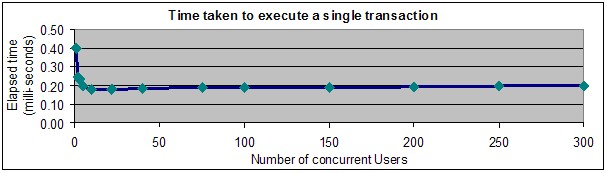
Consider the results cited in a report OpenRules received from a major international bank. The bank created a series of performance and scalability tests before selecting OpenRules as the BR product of choice. They demonstrated that OpenRules scales to more than 300 concurrent users on a hyper-threaded Xeon box. Each concurrent user executed its rules 10,000 times with the following results:
An OpenRules-based risk management system is in a production multi-user environment and the bank is highly satisfied with the real-world results. The references to this and other customer account are available upon requests.