| The OpenRulesTM Tutorials Home |
|
User's Guide |

Decision Tables
OpenRules supports several ways to represent business rules inside Excel tables. A decision table is the most popular way to present sets of related business rules. Decision tables are used to describe and analyze decision situations, where the state of a number of conditions determines the execution of a set of actions. OpenRules allows a user to configure different types of decision tables directly in Excel. The user also may use simple IF-THEN-ELSE statements to describe rules logic inside tables of type "Method".
Introducing Simple Rules Table ►top
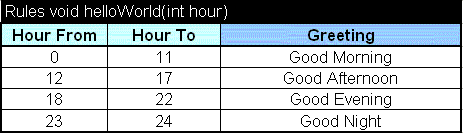
Let's consider a simple set of HelloWorld rules that can be used to generate a string like "Good Morning, World!" based on the actual time of the day. How one understands such concepts as "morning", "afternoon", "evening", and "night" is defined in this simple decision table:
Hopefully, this decision table is self explanatory. It states that if the current hour is between 0 and 11, the greeting should be "Good Morning", etc. You may change Hour From or Hour To if you want to customize the definition of "morning" or "evening". This decision table is oriented to a business user. However, its first row already includes some technical information (a table signature):
Rules void helloWorld(int hour)
Here "Rules" is the OpenRules keyword to recognize a table type as a decision table; "helloWorld" is a name of this particular decision table. It tells an external program or other rules how to launch this rule table. Actually, this is a typical description of a programming method (its signature) that has one integer parameter and returns nothing (the type "void"). The integer parameter "hour" is expected to contain the current time of the day. While you always can hide this information from a business user, it is an important specification of this decision table.
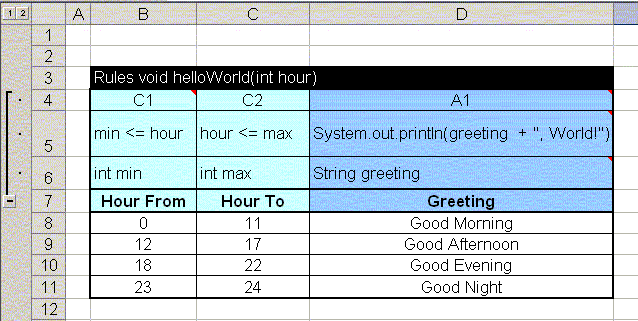
You may wonder where is the implementation logic for this decision table? All decision tables include additional hidden rows (usually password protected) that you can see if you click on the buttons "+" or open the Technical view. For example, click on the button "+" in the opened HelloWorld.xls file, and you will see the following additional rows:
This part of the rule table is oriented to a technical user, who is not expected to be a programming guru but rather a person with a basic knowledge of the "C" family of languages which includes Java. Let's walk through these rows step by step:
The Row "Condition and Action Headers" (see row 4 in the table above). The initial columns with conditions should start with the letter "C", for example "C1", "Condition 1". The columns with actions should start with the letter "A", for example "A1", "Action 1".
The Row "Code" (see row 5 in the table above). The cells in this row specify the semantics of the condition or action associated with the corresponding columns. For example, the cell B5 contains the code min <= hour. This means that condition C1 will be true whenever the value for min in any cell in the column below in this row is less than or equals to the parameter hour. If hour is 15, then the C1-conditions from rows 8 and 9 will be satisfied. The code in the Action-columns defines what should be done when all conditions are satisfied. For example, cell D5 contains the code: System.out.println(greeting + ", World!"). This code will print a string composed of the variable greeting and ", World!", where greeting will be chosen from a row where all conditions are satisfied. Again, if hour is 15, then both conditions C1 and C2 will be satisfied only for row 9 (because 9 <= 15 <= 17). As a result, the words "Good Afternoon, World!" will be printed. If the rules table does not contain a row where all conditions have been satisfied, then no actions will be executed. Such a situation can be diagnosed automatically.
The Row "Parameters" (see row 6 in the table above). The cells in this row specify the types and names of the parameter used in the previous row.
The Row "Display Values" (see row 7 in the table above). The cells in this row contain a natural language description of the column content.
The same table can be defined a little bit differently using one condition code for both columns "min" and "max":
How Decision Tables Are Organized [T] ►top
As you have seen in the previous section, decision tables have the following structure:
Row # Content Description 1 Signature Rules void tableName(Type1 par1, Type2 par2, ..) - Multi-Hit Rules Table
Rules <JavaClass> tableName(Type1 par1, Type2 par2, ..) - Single-Hit Rules Table2 Condition/Action Indicators The condition column indicator is a word starting with “C”.
The action column indicator is a word starting with “A”.
All other starting characters are ignored and the whole column is considered as a comment3 Code The cells in each column (or merged cells for several columns) contain Java Snippets in the language defined in the table Environment (the default language configuration is openrules.java).
Condition codes should contain expressions that return Boolean values..
If an action code contains any correct Java snippet, the return type is irrelevant.4 Parameters Each condition/action may have from 0 to N parameters. Usually there is only one parameter description and it consists of two words:
parameterType parameterName (for example: int min)
parameterName is a standard one word name that corresponds to Java identification rules.
parameterType can be represented using the following Java types:
- Basic Java types: boolean, char, int, long, double, String, Date
- Standard Java classes: java.lang.Boolean, java.lang.Integer, java.lang.Long, java.lang.Double, java.lang.Character, java.lang.String, java.util.Date
- Any custom Java class with a public constructor that has a String parameter
- One-dimensional arrays of the above types. Multiple parameters can be used in the situations when one code is used for several columns. See the standard example Loan1.xls
5 Columns Display Values Text is used to give the column a definition that would be meaningful to another reader (there are no restrictions on what text may be used) 6 and below Rules with concrete values in cells Cells in these rows usually contain literals that correspond to the parameter types.
For Boolean parameters you may enter the values "TRUE" or "FALSE" (or equally "Yes" or "No") without quotations.Empty cells inside rules means "whatever" and the proper condition is automatically considered satisfied. An action with an empty value will be ignored. If the parameter has type String and you want to enter a space character, you must explicitly enter one of the following expressions: :=" " or '=" " or { " "; }
Cells with Dates can be specified using java.util.Date. OpenRules uses java.text.DateFormat.SHORT to convert a text defined inside a cell into java.util.Date. Before OpenRules 4.1 we recommended our customers not to use Excel's Date format and define Date fields in Excel as Text fields. The reason was the notorious Excel problem inherited from a wrong assumption that 1900 was a leap year. As a result, a date entered in Excel as 02/15/2004 could be interpreted by OpenRules as 02/16/2004. Starting with release 4.1 OpenRules correctly interprets both Date and Text Excel Date formats.
Valid Java expression (Java snippets) may be put inside table cells by one of two ways:
- by surrounding the expression in curly brackets, for example: { driver.age+1; }
- by putting ":=" in front of your Java expression, for example: :=driver.age+1
Make sure that the expression's type corresponds to the parameter type.
Note. Excel always is trying to "guess" what is the type of the text inside its cells and automatically converts the internal representation to something that is not exactly what you see, for example, Excel may use a scientific format for certain numbers. To avoid a "strange" behavior try to explicitly define the format "text" for the proper Excel cells.
How Decision Tables Are Executed ►top
Basic Execution Logic ►top
The rules inside decision tables are executed one-by-one in the order they are placed in the table. The execution logic of one rule (row in the vertical table) is the following:
IF ALL conditions are satisfied THEN execute ALL actions.
If at least one condition is violated (evaluation of the code produces false), all other conditions in the same rule (row) are ignored and are not evaluated. The absence of a parameter in a condition cell means the condition is always true. Actions are evaluated only if all conditions in the same row evaluated to be true and the action has non-empty parameters. Action columns with no parameters are ignored.
For the default vertical decision tables, all rules are executed in top-down order. There could be situations when all conditions in two or more rules (rows) are satisfied. In that case, the actions of all rules (rows) will be executed, and the actions in the rows below can override the actions of the rows above.
For horizontal decision tables, all rules (columns) are executed in left-to-right order.
Multi-Hit and Single-Hit Decision Tables ►top
Let's consider how the OpenRulesEngine executes some very simple rules that define a salutation "Mr.", "Mrs.", or "Ms." based on a customer's gender and marital status:
Rules void defineSalutation(Customer customer, Response response) Gender Marital Status Set Salutation Male Mr. Female Married Mrs. Female Single Ms. If a customer is a married female the conditions of the second rules are satisfied and the salutation "Mrs." will be selected. This is only a business view of the rules table. The complete view including the hidden implementation details ("Java snippets") are presented below:
Rules void defineSalutation(Customer customer, Response response) C1 C2 A1 customer.gender.equals(gender) customer.maritalStatus.equals(status) response.map.put("salutation",salutation); String gender String status String salutation Gender Marital Status Set Salutation Male Mr. Female Married Mrs. Female Single Ms. The OpenRulesEngine will execute rules (all 3 "white" rows) one after another. For each row if conditions C1 and C2 are satisfied then the action A1 will be executed with the selected "salutation".
Please note that for this table conditions for all 3 rules will be examined before executing any actions. This is an example of so-called "multi-hit" rules table that executes all rules it may "hit". We may add one more rules at the very end of this table:
Rules void defineSalutation(Customer customer, Response response) Gender Marital Status Set Salutation Male Mr. Female Married Mrs. Female Single Ms. ??? In this case, after executing the second rule OpenRulesEngine will also execute the new 4th rule and will override a salutation "Mrs." with "???". Obviously this is not a desirable result. However, sometimes it may have a positive effect by avoiding undefined values in cases when the previous rules did not cover all possible situations. What if our customer is a Divorced Female?!
How can this multi-hit effect be avoided? What if we want to produce "???" only when no other rules have been satisfied. To achieve this you may use a so-called "single-hit" table that is specified by putting any return type except "void" after the keyword "Rules". The following is an example of a single-hit rules table that will do exactly what we need:
Rules String defineSalutation(Customer customer, Response response) Gender Marital Status Set Salutation Male Mr. Female Married Mrs. Female Single Ms. ??? Another positive effect of such "single-hitness" may be observed in connection with large tables with say 1000 rows: if the OpenRulesEngine obtains a hit on rule #10 it would not bother to check the validity of the remaining 990 rules.
Having rules tables with a return value may also simplify your interface. For example, we do not really need the special object Response in which we used to write our defined salutation. Our simplified rules table produces a salutation without an additional special object:
Rules String defineSalutation(Customer customer) C1 C2 A1 customer.gender.equals(gender) customer.maritalStatus.equals(status) return salutation; String gender String status String salutation Gender Marital Status Set Salutation Male Mr. Female Married Mrs. Female Single Ms. ??? Please note that the last action in the table should return a value that has the same type as the entire single-hit table. The single-hit table may return any standard or custom Java class such as String or Customer. Instead of basic Java types such as "int" you should use the proper Java classes such as Integer in the table signature.
Here is an example of Java code that creates an OpenRulesEngine and executes the latest rules table "defineSalutation":
public static void main(String[] args) {
String fileName = "file:rules/main/HelloCustomer.xls";
OpenRulesEngine engine = new OpenRulesEngine(fileName);
Customer customer = new Customer();
customer.setName("Robinson");
customer.setGender("Female");
customer.setMaritalStatus("Married");
String salutation = (String) engine.run("defineSalutation", customer);
System.out.println(salutation);
}
To learn more about OpenRules execution logic click here. The standard OpenRules's installation contains many examples that demonstrate how to invoke OpenRulesEngine from regular Java applications (see projects HelloJava, HelloJsr94, HelloXMLCustomer) as well as from web-based applications (see projects HelloJsp, HelloForms, and HelloWS).
Simple AND and OR Conditions ►top
All conditions inside the same row (rule) are considered from left to right using the AND logic. For example, to express
if (A>5 && B >10) {do something}
you may use the rules table:
Rules void testAND(int a, int b)
C1
C2
A1
a > 5 b>10 System.out.println(text)
String x
String x
String text
A > 5
B > 10
Do
X
X
Something
To express the OR logic
if (A>5 || B >10) {do something}
you may use the rules table:
Rules void testOR(int a, int b)
C1
C2
A1
a > 5 b>10 System.out.println(text)
String x
String x
String text
A > 5
B > 10
Do
X
Something
X
Instead you always may execute directly a simple method:
Method void testOR(int a, int b)
If (a > 5 || b>10) System.out.println("Something");
Using Templates ►top
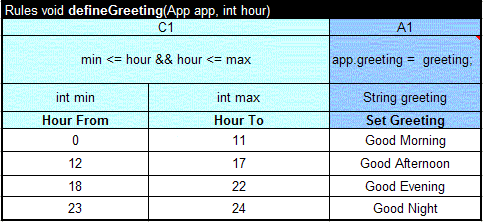
Rule Templates introduced in the OpenRules-5 allow rule designers to completely hide implementation details from business users. Rule templates are regular decision tables such as the "defineGreeting" table described above. However, if we want to use this table as a template for many other tables with the same structure but different rules, it is enough to use only the first 5 rows:
Rules void defineGreeting(App app, int hour) - Signature with parameters C1 A1 - Conditions and Actions identifiers min <= hour && hour <= max app.greeting = greeting;
- Java snippets describe condition/action semantics int min int max String greeting - Parameter types and names Hour From Hour To Set Greeting - Business names for conditions and actions We may use this decision table as a template to define different greeting rules for summer and winter time. An actual decision table implements the template table with particular rules:
Rules summerGreeting implements defineGreeting Hour From Hour To Set Greeting 0 10 Good Morning 11 18 Good Afternoon 19 22 Good Evening 23 24 Good Night and
Rules winterGreeting implements defineGreeting Hour From Hour To Set Greeting 0 11 Good Morning 12 17 Good Afternoon 18 22 Good Evening 23 24 Good Night Note that Rules tables "summerGreeting" and "winterGreeting" do not have technical information at all - Java snippets and a signature are defined only once and reside in the template-table "defineGreeting".
Click here to learn more about Rule Templates.
Using Expressions Inside Decision Tables ►top
OpenRules allows a rules designer to use two types of expressions inside decision table cells:
- Natural Language Expressions
- Java Expressions
Natural Language Expressions ►top
Starting with OpenRules release 4, a rules designer may use plain English expressions to define possible values of different decision variables inside rule tables. Instead of creating multiple columns for defining different ranges for integer and real values, a business user may define from-to intervals in practically unlimited English using such phrases as: "500-1000", "between 500 and 1000", "Less than 16", "More or equals to 17", "17 and older", "< 50", ">= 10,000", "70+", "from 9 to 17", "[12;14)", etc. Here is a simple example of a condition that specifies different credit scores:
Condition-2 interval.contains(c.outsideCreditScore) FromToInt interval AND
Outside Credit Score<= 100 (100;550] more than 550 and less or equal to 900 greater than 550 but less than 901 551 - 900 551-900 551-900 551-900 from 551 to 900 between 551 and 900 To read a detailed tutorial wit examples that describes how to apply natural language inside rule tables please click here.
Java Expressions ►top
The use of Java expressions provides a powerful ability to perform calculations and test for complex logical conditions. While the writing of expressions requires some technical knowledge, it does not require the skills of a programmer. Real-world experience shows that business analysts frequently have a need to write these expressions themselves. It is up to the decision table designer to decide whether to show the expressions to business people or to hide them from view. Let's consider a decision table for "Income Validation" from the provided example Loan1.xls:
Rules void ValidateIncomeRules(LoanRequest loan, Customer customer) C1 A1 customer.monthlyIncome * 0.8 - customer.monthlyDebt > loan.amount/loan.term loan.incomeValidationResult = result; boolean condition String result IF
Income is Sufficient for the LoanTHEN
Set Income Vaidation ResultNo UNSUFFICIENT Yes SUFFICIENT Here the actual income validation expression is hidden from business people inside "gray" technical rows, and a business person would only be able to choose between "Yes" or "No". However, the same table could be presented in this way:
Rules void ValidateIncomeRules(LoanRequest loan, Customer customer) C1 A1 condition == true loan.incomeValidationResult = result; boolean condition String result IF
Condition is TrueTHEN
Set Income Vaidation ResultUNSUFFICIENT := customer.monthlyIncome * 0.8 - customer.monthlyDebt > loan.amount/loan.term SUFFICIENT Now, a user can both see and change the actual income validation condition.
Notes:
1) Do not use Excel's formulas if you want the content to be recognized by the OpenRules engine: use OpenRules expressions instead.
2) If you want to start your cell with "=" you have to put an apostrophe in front of it i.e. '= to direct Excel not to attempt to interpret it as a formula.Using Java Methods to Represent IF-THEN-ELSE Rules ►top
Sometimes instead of creating a decision table it is more convenient to represent rules using simple Java expressions inside Method tables. For example, the above table "ValidateIncomeRules" looks awkward and could be more easily represented as the following Method table:
Method void ValidateIncomeRules(LoanRequest loan, Customer customer) if ( customer.monthlyIncome * 0.8 - customer.monthlyDebt > loan.amount/loan.term )
loan.incomeValidationResult = "SUFFICIENT";
else
loan.incomeValidationResult = "UNSUFFICIENT";
Horizontal and Vertical Decision Tables ►top
Decision tables can be created in one of two possible formats:
- Vertical Format (default)
- Horizontal Format.
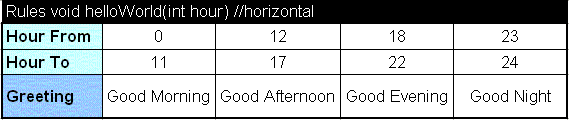
Based on the nature of the decision table, a rules creator can decide to use a vertical format (as in the examples above where concrete rules go vertically one after another) or a horizontal format where Condition and Action are located in the rows and the rules themselves go into columns. Here is an example of the proper horizontal format of the same decision table "helloWorld":
OpenRules automatically recognizes that a table has a vertical or a horizontal format. You can use Excel's Copy and Paste Special feature to transpose a decision table from one format to another.
Note. When a decision table has too many rules (more that you can see on one page) it is better to use the vertical format to avoid Excel's limitations: a worksheet has a maximum of 65,536 rows but it is limited to 256 columns.
Separating Business and Technical Information [T] ►top
During rules harvesting, business specialists initially create rules tables using regular Excel tables. They put just a table name in the first row and column names in the second row. They start with Conditions columns and end with Action columns. For example, they can create a table with 5 columns [C1,C2,C3,A1,A2] assuming the following logic:
IF conditions C1 and C2 and C3 are satisfied THEN execute actions A1 and A2
Then, a business specialist provides content for concrete rules in the rows below the title rows.
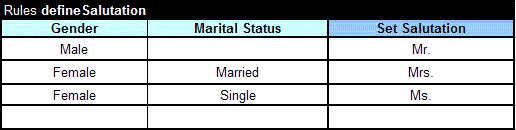
As an example, let's consider the decision table "defineSalutation" with the rules that define how to greet a customer (Mr., Ms, or Mrs.) based on his/her gender and marital status. Here is the initial business view (it is not yet syntactically correct):
A business analyst has initially created only five rows:
- A signature "Rules defineSalutation" (it is not a real signature yet)
- A row with column titles: two conditions "Gender", "Marital Status" and one action "Set Salutation"
- Rows with three rules that can be read like:
- IF Gender is “Male” THEN Set Salutation “Mr."
- IF Gender is “Female” and Marital Status is “Married” THEN Set Salutation “Mrs.”
- IF Gender is “Female” and Marital Status is “Single” THEN Set Salutation “Ms.”
While business specialists continue to define such decision tables, at some point a technical specialist should take over and add to these tables the actual implementation. The technical specialist (familiar with the software environment into which these rules are going to be embedded) talks to the business specialist (author of the rule table) about how the rules should be used. In the case of the "defineSalutation" rule table, they agree that the table will be used to generate a salutation to a customer. So, the technical specialist decides that the table will have two parameters:
1) a customer of the type Customer
2) a response of the type ResponseThe technical specialist will modify the signature row of the table to look like this:
Rules void defineSalutation(Customer customer, Response response)Then s/he inserts three more rows just after the first (signature) row:
- Row 2 with Condition/Action indicators
- Row 3 with Condition/Action implementation
- Row 4 with type and name of the parameters entered in the proper column.
Here is a possible complete implementation of this decision table:
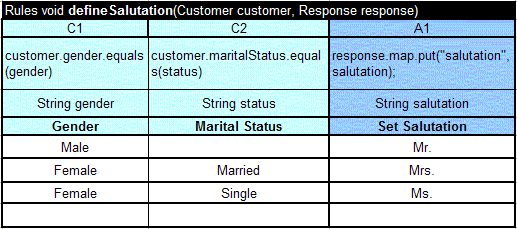
The rules implementer will decide that to support this rule table type Customer should have at least two attributes "gender" and "maritalStatus", and the type Response should be able somehow to save different pairs (names,value) like ("salutation","Mr."). Knowing the development environment, s/he will decide on the types of attributes. Let's assume that both types Customer and Response correspond to Java classes, and the attributes have basic Java type String. In this case, the column "Gender" will be marked with a parameter "String gender" and the condition will be implemented as a simple boolean expression:
customer.gender.equals(gender)
The second column "C2" is implemented similarly with a String attribute and a parameter maritalStatus. Finally (to make it a little bit more complicated) we will assume that the class Response contains an attribute map of the predefined Java type HashMap, in which we can put/get pairs of Strings. So, the implementation of the action "Set Salutation" will look like:
response.map.put("salutation",salutation).
Merging Cells ►top
OpenRules recognizes the powerful Cell Merging mechanism supported by Excel and other standard table editing tools. Here is an example of a rules table with merged cells:
Rules void testMerge(String value1, String value2) Rule C1 C2 A1 A2 value1.equals(val) value2.equals(val) out("A1: " + text); out("A2: " + text); String val String val String text String text # Name Value Text 1 Text 2 1 B One 11+21 12 2 Two 22 3 Three 31 32 4 D 41 42 The semantics of this table is intuitive and described in the following table:
Value 1 Value 2 Applied Rules Printed Results B One 1 A1: 11+21
A2: 12B Two 2 A1: 11+21
A2: 22B Three 3 A1: 31
A2: 32D Three 4 A1: 41
A2: 42A Two none D Two none Restriction. We added the first column with rules numbers to avoid the known implementation restriction that the very first column (the first row for horizontal rule tables) cannot contain merged rows. More examples can be found in the standard rule project "Merge" - click here to analyze more rules.
Data Types for Decision Tables [T] ►top
The business logic expressed in the decision tables should not depend on the implementation of the objects these rules are dealing with. For example, if the rules says: “If driver's age is less than 17 then reject the application” the only thing this business rule should "know" about the object “driver” is the fact that it has a property “age” and this property has a type that support a comparison operator “<” with an integer. It is a matter of configuration whether the Driver is a Java class or an XML file, or a DB table from a legacy system.
Based on this principle of rules independent of object data types, OpenRules supports different data sources and data types:
Java Classes
XML
Excel tables
DB tables (to be added in the future releases).
You may look at the examples of the supporting Java classes by opening ClassCustomer.java and ClassResponse.java.
See more predefined data types here.
Hide/Show Technical Information ►top
Based on concrete skills and responsibilities, access to technical information can be limited to certain people with certain rights. Usually, a technical rules administrator selects the second, third, and fourth rows in any rule table, and goes to the Excel Menu "Data+Group and Outline+Group". The outline symbols "+", "-", and [1][2] will appear on the left of the table. Now it is possible to protect the access to these rows (do not show, view only, or update) using the Excel protection mechanism.
Columns with Multiple Sub-Columns ►top
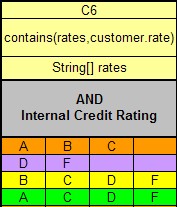
One table column can consist of several sub-columns (see sub-columns "Min" and "Max" in the example above). You may efficiently use the Excel merge mechanism to combine code cells and to present them in the most intuitive way. Here is an example with an unlimited number of sub-columns:
As you can see, condition C6 contains 4 sub-columns for different combinations of rates. The cells in the Condition, code, parameters and display values rows are merged. You can insert more sub-columns (use Excel's menu "Insert") to handle more rate combinations if necessary without any changes in the code. The parameter row is defined as an String array: String[] rates. The actual values of the parameters should go from left to right and the first empty value in a sub-column should indicate the end of the array "rates". You can see the complete example in the rule table "Rule Family 212" in the file Loan1.xls.
If your decision table has a horizontal format, you may use multiple sub-rows in a similar way (see the example in file UpSell.xls).
Defining Comparison Operators Inside Rule Tables ►top
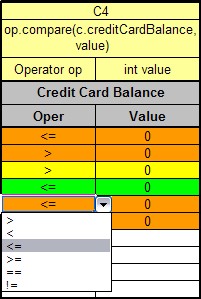
A user can employ a comparison operators such as "<" for "less" or ">" for "more" directly inside the rules. There are several ways to accomplish this. Here is an example from the rule table "Rule Family 212" (Loan1.xls):
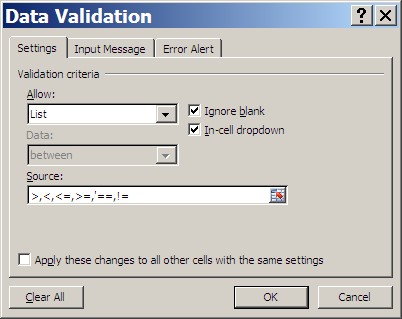
You may use the Excel Data Validation menu to limit the choice of the operators:
Here the sign "==" has an apostrophe in front to differentiate it from an Excel formula. The actual implementation of possible comparison operators is provided as an example in the project "com.openrules.tools" (see com.openrules.tools.Operator.java). You may change them or add other operators. Along with values of the type "int" you may apply similar Operator to compare long, double, String types.
Comparing Dates ►top
You also may use the standard java.util.Date and any other Java Comparable type. Here is an example of comparing Dates:
C1 op.compare(visit.date,date) Operator op Date date Operator Date == 2/15/2007 != 1/1/2007 <= 2/15/2007 > 2/15/2007 < 2/15/2007 Please note that the current implementation compares dates without time.
Another way to use operators directly inside a table, is to use expressions. In the example above, instead of having two sub-columns "Oper" and "Value" we could use one column and put an expression inside the cell:
{ c.creditCardBalance <= 0; }
The use of expressions is very convenient when you do not know ahead of time which operator will be required for which columns.
Using Boolean Values ►top
When you just want just to get a Yes or No answer from a user, you can define the proper column with a Boolean parameter as in the example above. You are allowed to use the following values inside columns defined as "Boolean" :
- True, TRUE, Yes, YES
- False, FALSE, No, NO
Here are examples:
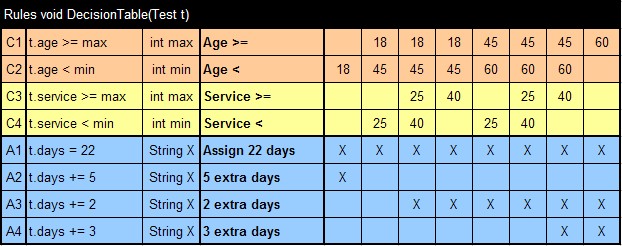
C1 condition boolean condition IF Condition TRUE FALSE Yes NO {loan.additionalIncomeValidationNeeded;} Sometimes, you want to use something like X or * just to indicate that an action should be executed. For example in this table (from VacationDays.xls):
only actions marked with "X" will be executed. You can use any other character instead of "X".
►top